The Chery Tiggo 7 Pro arrived locally early in 2022 and quickly became a popular choice amongst SUV buyers due to its affordable price and generous standard specification. While the 18-inch alloy wheels on the Executive variant or the muscular design of the range might draw your attention first, the interior offers some very exciting features too.
If you are considering purchasing a Chery Tiggo 7 Pro, remember you can sell your car quickly and conveniently with the Instant Offer tool on our website and find the best deals on new or used Chery Tiggo 7 Pro models on AutoTrader here.
Related: How many airbags does a Chery Tiggo 7 Pro have?

Connect iPhone
Step inside the cabin of the Chery Tiggo 7 Pro and you will first be confronted by a 7.0-inch digital instrument cluster behind the steering wheel. Here is where you can find a lot of information about the vehicle, the current trip, as well as from the infotainment system. However, when you look towards the centre console you will note two digital touchscreens.
The one down below replaces many auxiliary knobs and buttons and allows the occupants to control the climate control functions. The display we need to focus on is the 10.25-inch LCD touchscreen on top of the dashboard. This is where you will be accessing the infotainment functions of the vehicle.

Bluetooth
Connecting your iPhone via Bluetooth will gain the operator access to hands-free telephony functions and streaming of audio. In order to connect your iPhone, ensure that your Chery Tiggo 7 Pro is stationary and that park is selected on the transmission. The vehicle will not allow you to pair your phone while in motion to prevent the driver from being distracted while driving.
1. Press the home button on the infotainment system.
2. Go into the settings menu and select phone settings.
3. Select to pair a new device via Bluetooth.
4. Ensure the Bluetooth on your iPhone is switched on and search for the Chery Tiggo 7 Pro.
5. On your iPhone, select the vehicle and follow the easy prompts on both the phone and infotainment system displays.
6. Once all the prompts are followed, your iPhone will now be connected to the vehicle and will automatically connect in the future provided the Bluetooth on your phone is switched on.
You will now be able to make and receive calls through the vehicle's audio system and will be able to control limited functions such as starting and ending a call or skipping a music track on your phone with the steering wheel controls.
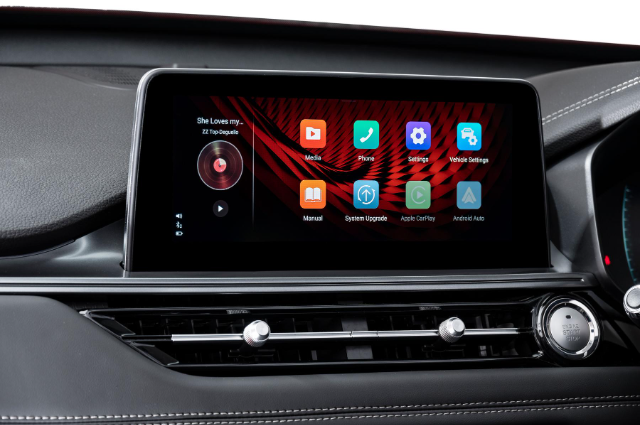
Apple CarPlay
In order to get the best hands-free experience from your infotainment system, it is best to connect your iPhone to the Apple CarPlay system. For this, you will need a USB cable for your iPhone with a USB-A connection at one end. In order to connect your iPhone, ensure that your Chery Tiggo 7 Pro is stationary and that park is selected on the transmission. The vehicle will not allow you to pair your phone while in motion to prevent the driver from being distracted while driving.
1. Connect your phone via the USB cable to the vehicle.
2. The infotainment system will prompt you to ask if you would like to start Apple CarPlay.
3. Agree and follow the prompts with usage terms and conditions and agree at the end.
4. Your phone is now connected to the vehicle's Apple CarPlay.
With Apple CarPlay, you will be able to access some of your favourite navigation and entertainment apps such as Waze and Spotify directly on the infotainment screen.