The device is connected
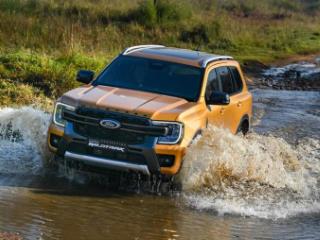
With its mid-2023 release, Ford expanded its Everest lineup with new drivetrain and trim options. One of these new introductions is the Wildtrak derivative with its yellow stitching and embroidery as well as premium tech and features.
Related: Ford Everest Wildtrak (2023) Review
The highlight of these new features is Ford's SYNC infotainment system with its massive portrait touchscreen and wireless connectivity. This new tech could be intimidating, but we can help break down how you connect your smartphone to your Wildtrak in a few easy steps.
Is the Ford Everest Wildtrak good for new drivers?

The Wildtrak is equipped with a dedicated off-road SYNC screen and a rotary Drive Modes control that accesses six settings: Normal, Eco, Tow/Haul, Slippery, Mud & Ruts, and Sand. It also features an impressive range of driver assistance technologies as standard, comprising Adaptive Cruise Control with Stop & Go and Lane Centering, Blind Spot Monitoring with Trailer Coverage, Cross Traffic Alert, Evasive Steer Assist, Lane Keeping System with Road Edge Detection, Pre-Collision Assist, Reverse Brake Assist and Tyre Pressure Monitoring System (TPMS). - Ford SA

Bluetooth Connection
To connect your iPhone to your Ford Everest, you can follow these general steps:
- Enable Bluetooth on your iPhone by going to Settings > Bluetooth and toggling it on.
- Turn on your Ford Everest and navigate to the Bluetooth settings on the infotainment system.
- Choose "Pair Device" and select "iPhone" from the list of available devices.
- Follow the prompts on the infotainment system to complete the pairing process, which may involve entering a PIN or confirming a code on both your iPhone and the Wildtraks system.
- Once the pairing process is complete, your iPhone should be connected to the Ford Everest via Bluetooth, and you should be able to play music, make calls, and use other phone-related features through the car's system.
*Note that the specific steps may vary depending on the make and model of your Everest and the version of iOS on your iPhone. Refer to the car's manual or contact the manufacturer for more detailed instructions if needed.
Check out AutoTraders Car Subscription Service here

Connecting with Apple CarPlay
To connect your Ford Everest Wildtrak with your iPhone's built-in Apple CarPlay functionality, you will need to insert a USB cable into either the USB A or USB C slots situated below the climate control panel in the Wildtrak. Once the aforementioned USB connection links the phone and vehicle, the driver will need to follow the prompts on both their smart device and on the vehicle's infotainment screen.
What is covered under Ford Everest Wildtrak manufacturer car warranty?
Wireless connection
For those that wish to have wireless Apple CarPlay, simply tick 'Enable wireless Apple CarPlay' when your device prompts you. Then you can charge the device using either the cable or the wireless charger while ensuring CarPlay is active at all times. You should now be able to access your navigation, apps, and music streaming with ease!