Motoring journalists around the world are singing the praises of the new Peugeot 2008. The rumbunctious compact crossover is challenging the way that people think about mobility, one small step at a time. From quirky design features such as the small steering wheel, brave new technology in the form of a 3D driver display, and robust build quality with sprightly performance, the 2008 is proving to be the best compact SUV you never knew you needed.
Related: Peugeot 2008 (2021) SUV Review — The cat that should get the cream

Peugeot 2008 (GT models)
Our rating: 3.5/5
It's one thing to challenge the norm but in the case of the Peugeot's infotainment system, things go a little awry. While there's is nothing serious to complain about regarding the installed hardware, it's the user interface that gets a little muddy.
The 2008 is fitted with a large, 10-inch touchscreen infotainment system that forms part of the i-Cockpit technology in modern Peugeot offerings. It's complemented by a 3D driver display that allows for customizable layouts, which include infotainment and navigation. Colours and themes are customisable but options are somewhat limited in this regard.
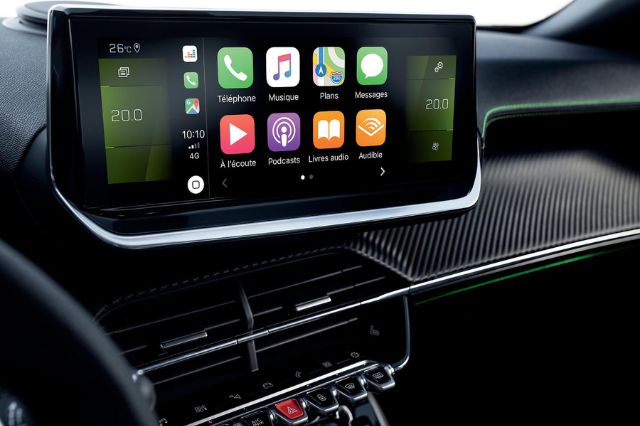
Primary interaction is in the form of a singular rotary knob for volume control as well as a touch-pad area that is situated above the toggle switch panel in the centre fascia. These provide shortcuts to apps, navigation and settings. A multifunction steering wheel house further audio controls for basic functions such as volume, track/station skip and voice command. The system will accept inputs from USB (type A and C), Bluetooth, AM/FM tuning and is Apple CarPlay and Android Auto enabled. A handy feature that we quite enjoyed was the drop-down smartphone cradle that allows for your phone to be placed in a convenient spot on the fascia.
Our biggest gripe was around the fact there is no home screen to the OS, one either selects a media source, navigation, or a settings page. While this works in theory, it takes longer than usual to become accustomed to. Furthermore, the HVAC display forms part of the infotainment screen which eats away into the usable real estate. While not a major concern, it too is one that takes getting used to.

Hyundai Creta
Our rating: 4/5
Simple, clean, and familiar. That's the best way to describe the 8-inch touchscreen infotainment system in the latest Hyundai Creta. While some may be undecided about the exterior styling, the design and layout of the infotainment system will keep you appeased.
As mentioned, the Creta employs an 8-inch touchscreen infotainment system with clean and clear, easy-to-use controls. The screen is flanked by six stylish bar-like buttons for shortcuts and two rotary knobs for adjusting volume and tuning stations. The volume control is placed on the furthest corner from the driver but we've become accustomed to the LHD layout. A multifunction steering wheel provides additional audio controls.

The system will accept inputs from USB and Bluetooth and is AM/FM enabled. Apple CarPlay and Android Auto work seamlessly with the infotainment system allowing for the omission of a standard navigation system. Voice control is also included for those that prefer to speak their instructions.
Mitsubishi Eclipse Cross
Our rating: 3/5
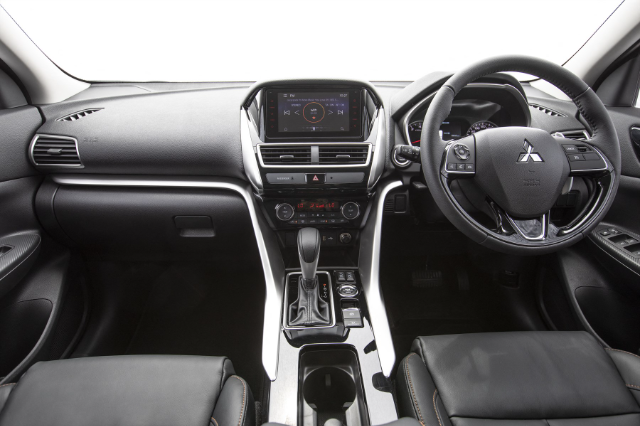
The Mitsubishi Eclipse Cross is the one that falls short in this comparison for several reasons. This system has the smallest screen of the three, coming in at only 7-inches. It is also devoid of tactile controls for the interface, relying solely on touch areas around the perimeters of the dashboard-mounted screen to control basic functions. A multifunction steering wheel is in play, allowing the driver to adjust the volume and skip tracks as need be. Voice control is included.
The system welcomes USB input along with Bluetooth and tethering for smartphones in the way of Apple CarPlay and Android Auto. These connections are physical and require the use of a USB cable (the two competitors suffer the same fate), no wireless CarPlay just yet.
We found the OS to also be of an older design and feel, responding slower than we would have liked at times. Nevertheless, it uses a simple and intuitive menu system and settings are easily found and adjusted when stationary.