
Handover Day: The Volkswagen Polo's main controls explained
Handover Day: The Volkswagen Polo's main controls explained


By Martin Pretorius
The time has finally come to take home your new car. But, in your excitement, you didn't pay attention to the salesperson's effort to show you how to operate it.... Fear not, because here's a quick overview of the main controls you'll need to know before you can drive off into the sunset.
We're going to assume that you managed to unlock the door, get in, and buckle your safety belt all by yourself. We're also not going to try to explain any unusual controls fitted to your vehicle – that's what the owner's manual is for, so please read it!
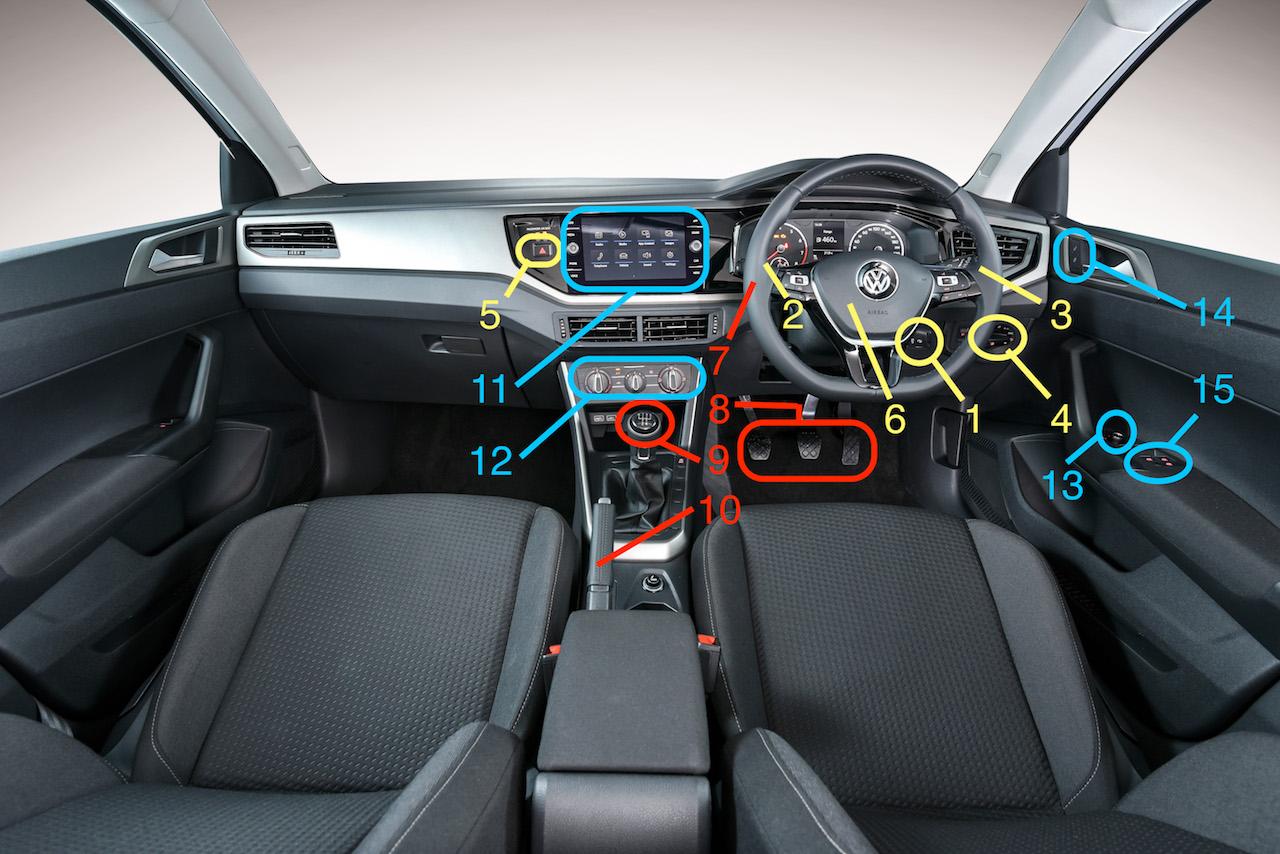
1. Ignition key/Engine start button
This is where you turn the car on and off. If your car is equipped with keyless entry and keyless start, you'll find that button here.
2. Indicator stalk
It's hidden away behind the steering wheel, but by all means, please use it. This one operates those cheerful little lights on the outside corners of your car, which show other road users which way you're going to turn.
3. Wipers
When the rain starts to fall, moving this stalk up or down operates the wipers. It also operates the screen washer (pull the lever towards you) and the rear screen wiper (push the stalk away from you). If your car has automatic wiper control, just set it to “Auto”.
4. Light switch
To turn on the head- and tail lights, twist this rotary switch clockwise, and to turn them off, twist it counter-clockwise. Simple. It's even simpler if your car has automatic headlights, in which case you can just turn the switch to “Auto”.
5. Hazard warning lights
Only use this in case of an emergency or when you encounter hazardous conditions. A Gauteng rainstorm doesn't count as an emergency, and neither does double parking...
6. Hooter
Use this noise maker to warn other road users of your presence, or to say a last good-bye to your family as you pull out of your driveway.
7. Steering wheel
Use this to make your car change direction.
8. Pedals
The rightmost one is the accelerator – it makes the car go faster,
The middle one is the brake – it makes the car go slower.
The left one is the clutch – automatic cars doesn't have this pedal.
9. Gear selector
This lever lets you decide in which direction you want to travel, and how fast. In an automatic car, “D” takes you forward, “R” gives you reverse gear, and “P” should only be used when the car is parked. With a manual gearbox, it gives you the 6 forward gears and reverse.
10. Handbrake
Only use this when parking. If the lever is pulled up, the parking brake is on, and if it's down, the parking brake is off.
11. Infotainment system
Where you can play your favourite music, connect your phone via Bluetooth, or tune in to the afternoon drive show on your way home.
12. Air-con controls
This is where you set the cabin temperature you want, and how much fresh air the fan has to blow through the vents.
13. Mirror adjustment
This little stalk controls the rear-view mirror adjustment. Twist it left or right to select the matching mirror before adjusting them.
14. Central locking
A convenient central spot from which you can lock or unlock all the doors at once.
15. Window controls
Another central control spot, this time to open or close the windows, as well as disable the rear door glass to keep your children safely in the car.